
Send & Receive Fax Online
20 free pages with Google sign-in.
Upload your document, enter the number, and hit send (Chrome extension or Web app)
Send a fax now

Drag & drop files here, or click to select
Includes 20 free pages with Google sign-in · No credit card required
How to Send a Fax Without a Fax Machine
From upload to delivered fax in under a minute.
Enter the fax number
US or international. Browserfax sends to 40+ countries and checks the number as you type.
Upload your document
Drop your PDF, JPG, or PNG right on this page. Several files merge into one fax automatically.
Sign in & send
One-tap Google sign-in includes 20 free pages. Watch delivery status live. No credit card, no forms.
No installation needed, or add the Chrome extension for one-click access while you browse.
A Complete Online Fax Service in Your Browser
Everything a fax machine does, without the machine, the phone line, or the paper.
20 free pages
Sign in with Google and fax instantly. No credit card required
Secure by design
Documents encrypted in transit and at rest, processed locally in your browser
Your own fax number
Get a dedicated US fax number instantly, with unlimited incoming faxes
PDF, JPG & PNG
Send several files at once, merged into a single fax automatically
Live status & auto-refund
Queued → Sending → Delivered. If a fax fails, your pages come right back
40+ countries
Send faxes internationally, straight from Chrome
Two Ways to Fax, One Account
Use whichever fits the moment. Your free pages and balance work in both.
On the web
Nothing to install. Works in any browser, on any device, including your phone.
Sending a one-time fax? Start right here.
Send a fax nowChrome extension
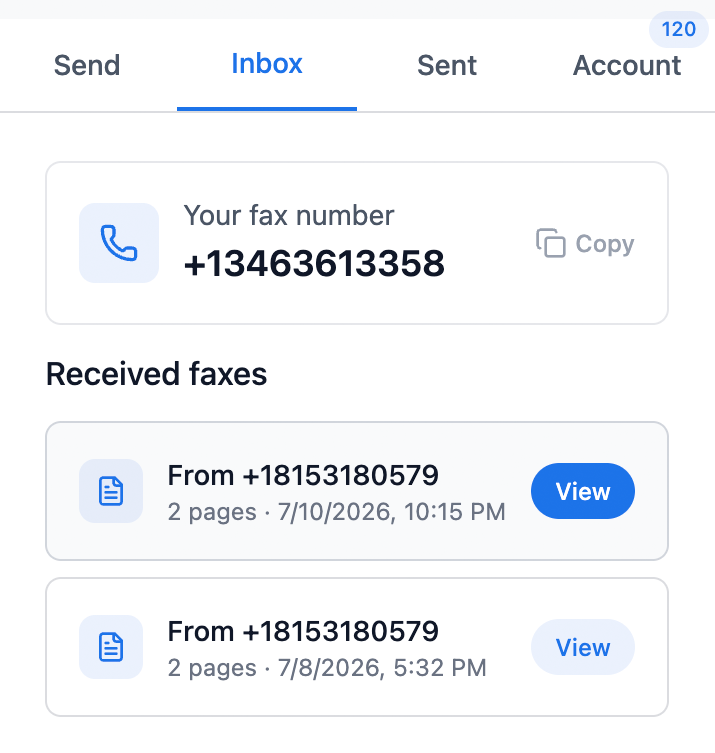
One click from any tab, with your fax inbox in Chrome's sidebar.
Fax regularly? This is for you.
Add to ChromeOne account. Same pages, same pricing. Sign in with Google and your balance follows you.
Receive Fax Online
Need to get faxes, not just send them? Browserfax plans include a dedicated US fax number with unlimited incoming faxes, delivered straight to your browser and your email inbox.
- Dedicated US fax number, set up instantly
- Unlimited incoming faxes on every plan
- Fax to email: get notified with a download link when a fax arrives
Simple Pricing, No Subscription Needed
Start with 20 free pages. Then pay once for pages, or subscribe to get your own fax number.
Start free
Every account starts free so you can send real faxes before paying anything. Just sign in with Google. No credit card, no trial timer.
One-time pages
$4
25 pages
16¢ / page · never expires
$11
100 pages
11¢ / page · never expires
$49
1000 pages
5¢ / page · never expires
One-time fax? Pay once, no subscription.
Fax number plans
$8/mo
Basic
- Your own US fax number
- Unlimited receiving
- 100 pages / month
$16/mo
Pro
- Your own US fax number
- Unlimited receiving
- 500 pages / month
Annual billing = 3 months free
Same pricing on web and extension.
Frequently Asked Questions
How do I send a fax without a fax machine? +
Upload your document (PDF, JPG, or PNG) right on this page, enter the recipient's fax number, and click send. You'll sign in with Google at the last step and get 20 free pages, no credit card required. No fax machine, no phone line, nothing to install.
Do I need to install anything to send a fax? +
No. You can send a fax directly from this page in any browser, on any device, with nothing to install. If you fax regularly, the optional Browserfax Chrome extension puts one-click faxing and your fax inbox in Chrome's sidebar.
What's the difference between the web version and the Chrome extension? +
They're the same service with the same account. The web version works on any device with nothing to install, ideal for one-time faxes. The Chrome extension is one click away in any tab and shows your fax inbox in the sidebar, ideal if you fax regularly.
Do my free pages and balance work on both web and extension? +
Yes. Your 20 free pages, purchased page packs, and plan all belong to your Google account. Sign in on the web or in the extension and you'll see the same balance everywhere.
Is Browserfax really free? +
You get 20 free pages when you sign in with Google, no credit card required. If you need more, one-time page packs start at $4 for 25 pages and never expire, so there's no subscription needed to send.
How do I get a fax number to receive faxes? +
Pick a Browserfax plan (Basic $8/mo or Pro $16/mo) and you get your own dedicated US fax number instantly, with unlimited incoming faxes. Received faxes appear in the extension and you get an email notification with a download link.
Is online faxing with Browserfax secure? +
Yes. Your documents are processed locally in your browser and encrypted in transit and at rest. Documents are not retained longer than needed for transmission.
Do I need a phone line or any hardware? +
No. Browserfax replaces the fax machine entirely. Everything happens in your browser. There is no hardware, no phone line, and nothing to install.
What files can I fax? +
You can fax PDF, JPG, and PNG files, including multi-page documents. Select several files and Browserfax merges them into a single fax before sending.
How do I know my fax was delivered? +
Every fax shows its real status (Queued, Sending, then Delivered or Failed) on screen, and you get an email confirmation too. If a fax fails, the pages are automatically refunded to your balance.
Can I send faxes internationally? +
Yes. Browserfax sends faxes to 40+ countries, straight from your browser.
Send Your First Fax Free in Under a Minute
20 free pages, no credit card, no fax machine, and nothing to install.